Vision Board With Goals: Attach a Step to Every Image
Most vision boards show dreams without the steps to reach them. Here is how to attach a backward plan to every image and turn your board into a real roadmap.
TL;DR: A vision board is a collection of dreams, not a plan. The images keep your goals visible, but without attached steps, the board becomes decoration instead of a tool. The fix is to name the specific goal behind every image, work backward from each goal to find the milestones, and let the smallest step guide your week.
How Vision Boards and Goals Work Together
Vision boards do one thing well: they clarify what you want. A picture of a beach, a van, a fit body, a successful business. Each image captures a desired outcome and keeps it top of mind. That clarity has real value.
But vision boards stop there. They show the destination without the route. The image tells you where you want to end up, but it does not tell you what comes first, what depends on what, or what to do this week. When the initial motivation fades, and it always does, the board becomes wallpaper.
The fix is not to abandon the board. It is to attach a goal and a plan to every image. Each picture on your wall should have a backward chain of steps pinned next to it. The image keeps the dream vivid. The plan makes it real.
This is the gap covered in our post on why vision boards fail, which explains why boards stall after the initial rush of inspiration. The missing piece is always the same: a plan attached to the dream.
Step 1: Name the Goal Behind Every Image
Look at your board. Each image represents something you want. But most vision board images are vague. A beach scene could mean "vacation once a year," "live by the sea," or "retire early." You have to name the specific goal before you can plan it.
Take each image and write a concrete goal beneath it. Use the same format you would use in any goal-setting tool: what exactly do you want, and by when?
Beach image. "Live six months a year by the sea by 2028."
Van image. "Live on the road full-time by July 2027."
Fit body image. "Run a marathon in under 4 hours by December."
The more specific the goal, the easier it is to build a backward plan from it. A vague desire produces a vague plan.
This is the same principle used in action boards, where every image gets both a dream and a route to reach it.
Step 2: Attach a Backward Chain to Each Goal
Once each image has a named goal, work backward from it to find the steps. Pick one goal from your board. Write it at the top. Now ask: what has to be true just before this goal is real? Write that down. Then ask again. Keep going until you reach something you can do this week.
This is backward planning. The result is a chain of milestones that turns a vague dream into a sequence of specific tasks.
Say your vision board has a van picture. The goal is "Live on the road full-time by July 2027." Working backward from that finish line:
- Living on the road: the van is bought and converted
- Before that: you have enough savings and a plan for the build
- Before that: you know which van model fits your needs
- Before that: you have a remote income stream
- Before that: you have researched what van life costs
Each milestone can be broken into smaller steps. The smallest step, the one you can do this week, might be "research cost of living for van life in two regions (20 minutes)."
This approach works for any image on your board. The key is the backward direction: starting at the goal and working back to today, rather than starting today and hoping you guess your way forward.
Step 3: Let the Smallest Step Guide Your Week
Once you have a backward chain for each image on your board, your week becomes simple. Look at the smallest step at the bottom of each chain. Do that one.
The next week, the step above it becomes current. You never have to wonder what to do next because the plan was built from the finish line backward. Each step exists because the goal needs it.
This is where most vision boards fail. The initial rush of inspiration from making the board creates the illusion of progress. But without real steps to take, the motivation fades. A board with attached goals and attached steps does not have this problem, because the plan generates momentum regardless of how motivated you feel.
The approach also works as a companion to specific design tools. Our guide on how to make a digital vision board in Canva shows how to build the board itself. The backward chain is what you add after the board is up.
Want to skip the manual chain-building? GoalBranch generates your backward plan automatically: type any goal from your board and see your first step in 60 seconds.
Real Example: From Beach Image to Actionable Tree
The most common image on any vision board is a beach or coastal scene. It represents freedom, rest, and a simpler pace. Here is what a backward plan for that image looks like as a GoalBranch tree.
Goal: Live six months a year by the sea.
The backward tree has three main milestones. First, you need an income you can take anywhere, whether remote work, freelancing, or a location-independent business. Second, you need to find the right coastal town at a price you can afford. Third, you need your monthly costs low enough to make the lifestyle sustainable.
The tree breaks each milestone into smaller steps. The "Find my sea town" branch, for example, starts with shortlisting three candidate towns, visiting each one, comparing costs, researching rental prices, and making a final pick. The first step in the entire tree is researching winter rental prices in three coastal towns. It takes about 20 minutes.
That 20-minute task is the actual distance between a vision board image and real action.
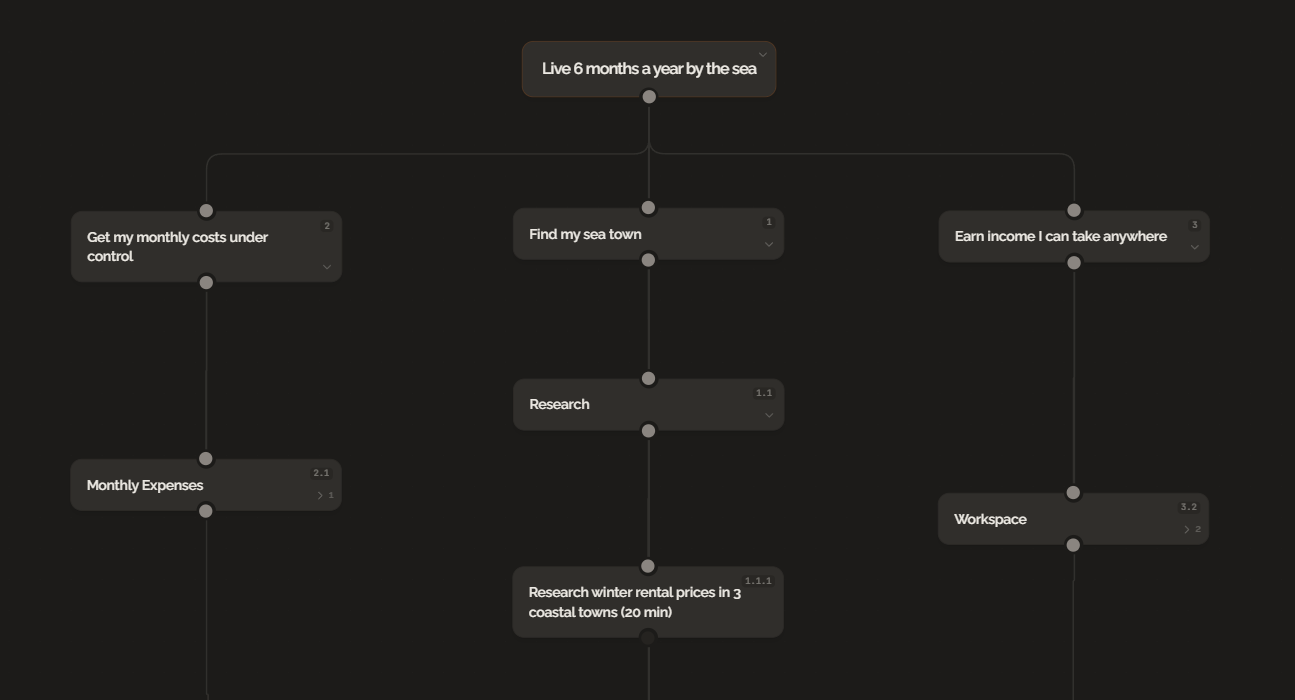
The root goal sits at the top. Three main milestones branch beneath it: earn income from anywhere, find the right coastal town, and get costs low enough. Each branch has its own sub-steps. The smallest step at the bottom is the one you can take this week.
This is what every image on your vision board should look like. A dream at the top. A chain of real steps below it. No guesswork, no hope, no waiting for motivation. Just a plan.
The Bottom Line
Your vision board has the right dreams. The only thing missing is the plan attached to each one. Name the goal behind every image, work backward from it to find the steps, and let the smallest step guide your week. Pick one image from your board today, write the goal beneath it, and take the step you find.
FAQ
How do you add goals to a vision board?
Start by naming the specific goal behind each image. A beach scene becomes 'live six months a year by the sea by 2028.' A van picture becomes 'live on the road full-time by July 2027.' Once every image has a named goal, work backward from each one to find the milestones and steps needed to reach it.
Should a vision board include action steps?
Yes. A vision board without action steps shows only the destination. Attaching a backward plan to each goal turns the board from inspiration into a real planning tool. The images keep the dream vivid. The steps make it real.
What kind of goals work best with backward planning on a vision board?
Goals with a clear outcome and a deadline convert most easily into backward plans. Specific targets like 'run a marathon by December' or 'live by the sea by 2028' produce better chains than vague desires like 'be happier.'
Can I use GoalBranch with a vision board?
Yes. Pick a goal from your board, type it into GoalBranch, and the tool generates a backward dependency tree with the steps you need. The image stays on your wall. The plan lives in the tree.
Ready to try backward planning on your own goals?
Start planning freeMore guides
Backward Design vs Backward Planning: Same Idea, Different Rooms
Backward design and backward planning share one logic: start at the outcome and work back. One belongs to education, the other to goals. See how they compare.
How to Plan a Goal When You Don't Know the Steps
You don't need to see the whole path to start a goal. Backward planning turns unknown steps into research questions and gives you a way forward starting today.