Best Free Vision Board Apps in 2026 (No Subscription Needed)
The vision board apps that are genuinely free in 2026, compared: Pinterest, Apple Freeform, Canva's free plan, and the free way to turn a board into steps.
TL;DR: "Free" in the app stores usually means free to download. The vision board apps that are genuinely free in 2026, with no subscription attached to anything a board actually needs, are Pinterest, Apple Freeform (preinstalled on every iPhone, iPad, and Mac), and Canva's free plan. Dedicated vision board apps typically include one free board and charge for the rest. And no board app, free or paid, turns the images into steps; GoalBranch's free plan covers that part with a goal tree at no cost.
Search your app store for a vision board app and almost every result says free. Most of them mean free to download: the first board is included, and more boards, more images, or the affirmation features sit behind a weekly, monthly, or annual charge.
The genuinely free options, the ones you can use forever without a card on file, are mostly not vision board apps at all. Pinterest is completely free. Apple Freeform comes free on every iPhone, iPad, and Mac. Canva's free plan handles a personal board comfortably. All three will hold your dream in images for as long as you want, at no cost.
What none of them do is turn the board into a plan. This comparison covers both halves: the apps that are truly free, and the free way to attach steps to the board once it exists. For the wider landscape including paid tools, see our digital vision board tools comparison.
What "Free" Really Means in Vision Board Apps
Dedicated vision board apps are businesses built on one product, so the free version is a demo. The pattern is consistent across the app stores: one board free, then a subscription for more boards, bigger image libraries, affirmations, and reminders. Perfectly Happy, one of the better dedicated apps, is a clear example: the free tier includes one board, affirmations, a gratitude journal, and widgets, and the premium tier runs $11 per month or $59 per year.
That is not a scam; it is just worth knowing before you invest an evening building a board inside an app that will meter your second one. The tools below are ordered by how much you get without ever paying.
Best for: Collecting images, on any device.
Pinterest is the default free vision board and has been for years. Boards are unlimited, the image supply is effectively infinite, and the algorithm keeps feeding you pictures that match the dream. It runs on the web, iPhone, and Android, so nothing about your setup matters.
Limitation: Pinterest boards grow instead of focusing. Fifty pins of dream kitchens feels productive, but a collection is not a decision, and Pinterest gives you no way to mark one image as the goal and act on it.
Apple Freeform
Best for: iPhone, iPad, and Mac users who want a real canvas with zero cost.
Freeform is the quietly great free option almost no roundup mentions. It comes preinstalled on every iPhone, iPad, and Mac, and there is no paid tier at all: no subscription, no in-app purchases, no locked templates. The open canvas takes photos, text, shapes, and stickers, which is everything a vision board needs, and boards sync across your devices.
Limitation: It is Apple-only, so Android and Windows users are out. And like every canvas, it is empty of opinion: no vision board templates, no image library, and nothing that connects a board to a goal.
Canva (Free Plan)
Best for: A designed board you can print or set as wallpaper.
Canva's free plan includes vision board templates, a large photo library, and downloads in standard formats, which is more than enough for a personal board. It is the best free option when you want the board to look finished rather than collected. We wrote a full walkthrough of making a vision board in Canva, including the one thing to do differently.
Limitation: Canva's output is a static image. It is a design tool, and the finished board is a picture of outcomes with no goals, steps, or next actions underneath.
Perfectly Happy
Best for: A dedicated daily visualization practice, if one board is enough.
Perfectly Happy is built specifically for vision boards: image search inside the app, affirmations, a gratitude journal, and home screen widgets that keep the board in your eyeline. The free tier is genuinely usable as long as you only ever need one board. It is built for iPhone and iPad via the App Store.
Limitation: One free board is the ceiling, and everything past it is subscription territory. If you want a board per life area, the free tier runs out on day one.
GoalBranch (Free Plan)
Best for: Turning the board into steps, free.
GoalBranch starts where every board app stops. You type the goal that is on your board, and it breaks the goal backward into a tree of milestones and steps, ending in a first step small enough to do this week. The free plan includes 1 goal tree and 25 tree actions per month, with no card required; the paid plan ($9 per month) only matters once you are planning many goals at once.
Limitation: GoalBranch is not a collage tool. There is no image grid and no mood board, so it does not replace the apps above; it completes them. Make the board in Freeform or Canva, then plan its most important image here.
Comparison Table
| App | Best for | What the free version includes | Subscription needed? | Turns the board into steps |
|---|---|---|---|---|
| Collecting images | The entire app, unlimited boards | No | No | |
| Apple Freeform | Apple users, open canvas | Everything; preinstalled, no paid tier exists | No | No |
| Canva Free | Designed, printable boards | Templates, photo library, standard downloads | No, for a personal board | No |
| Perfectly Happy | Daily visualization practice | One board, affirmations, gratitude journal, widgets | Yes, beyond one board ($11/mo or $59/yr) | No |
| GoalBranch Free | Planning the goal behind the board | 1 goal tree, 25 tree actions per month | No; $9/mo Pro is optional | Yes |
Every row above keeps the dream visible for free. Only one row produces the steps. If your board already exists, generate the plan for its most important image, free, and see your first step in 60 seconds.
From Free Board to First Step: A Worked Example
Here is why the last column of that table matters. A 2017 study in Psychological Science (Park, Lu, and Hedgcock) found that people who planned backward completed more tasks and reported greater motivation, higher goal expectancy, and less time pressure than forward planners. The board is the destination; the backward plan is the route.
Take the most pinned dream on any board: the kitchen. As a Pinterest board it stays a collection of other people's kitchens. As a goal, "Renovate the kitchen for under $15,000 by next June" planned backward becomes three branches:
Lock the plan. Layout, budget, and who does the work. The branch bottoms out in a first step that takes about 20 minutes: get 3 contractor quotes requested.
Order the long-lead items. Cabinets and countertops carry an 8 to 10 week lead time, so this branch has a deadline the collage never showed you.
Build. Demo week gets scheduled around the delivery date, not around enthusiasm.
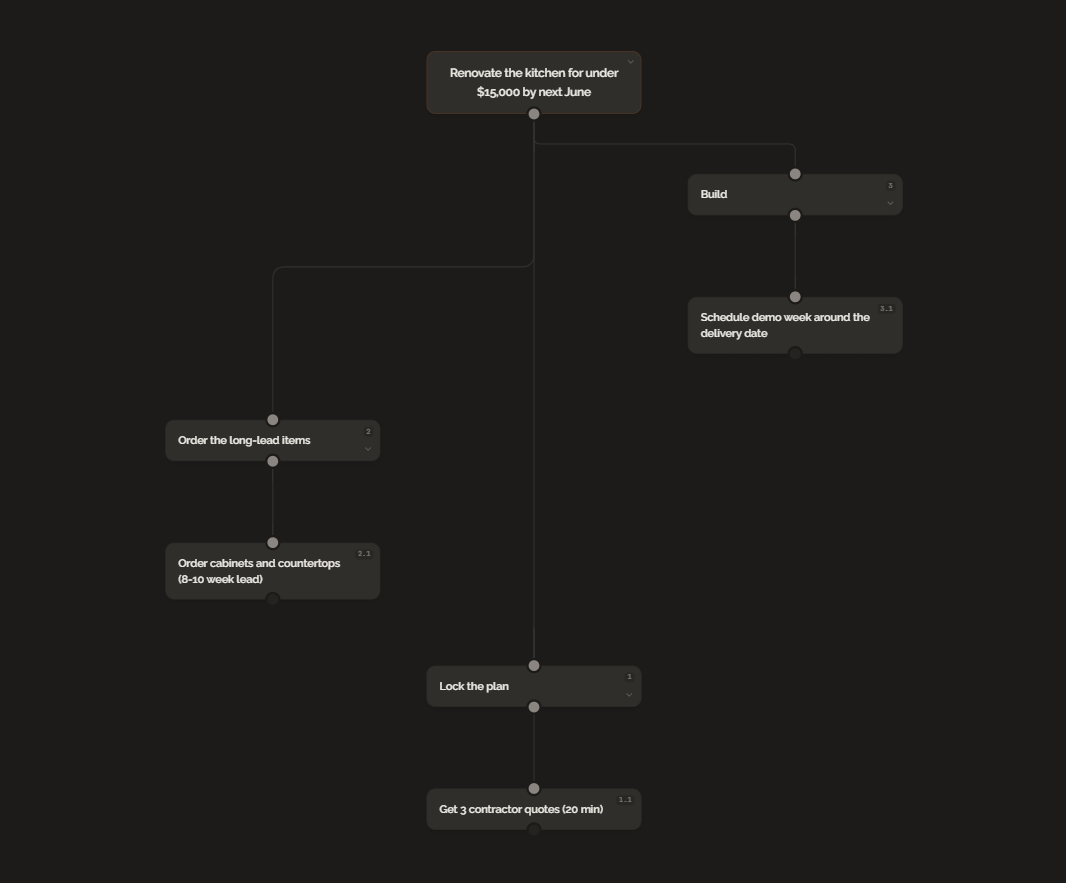
The board did its job: it made the kitchen impossible to forget. The tree does the other job: tonight's step is requesting three quotes, and the free plan covers it.
The Bottom Line
You do not need to pay for a vision board in 2026. Pinterest collects, Freeform arranges, and Canva designs, all genuinely free, while most dedicated board apps meter you after the first board. Whichever you pick, do not stop at the board: choose its most important image, plan it backward, and do the first small step this week.
FAQ
Is there a completely free vision board app?
Yes. Pinterest and Apple Freeform are completely free with no subscription or paid tier, and Canva's free plan covers a personal vision board. Most apps with "vision board" in the name are free to download but keep anything beyond the first board behind a subscription.
Why do most vision board apps ask for a subscription?
They follow a freemium model: the download is free and usually includes a single board, while extra boards, image libraries, and affirmation packs sit behind a recurring charge. General-purpose tools stay free because vision boards are not what pays their bills.
What is the best free vision board app for iPhone?
Apple Freeform. It comes preinstalled on iPhone, iPad, and Mac, has no subscription and no paid tier, and its open canvas handles images, text, and shapes, which is everything a vision board needs.
Can a free vision board app help you actually reach your goals?
A board keeps the goal visible, but it does not produce the steps. Pick the one image on your board that matters most and break it backward into milestones until you reach a first step small enough to do this week, like the contractor-quote step in this post's kitchen example.
Ready to try backward planning on your own goals?
Start planning freeMore guides
Best Goal Planning Apps in 2026 (Free and Paid)
From free habit trackers to AI goal planners, here are the best goal planning apps in 2026 compared by features, pricing, and what they help you do in detail.
Digital Vision Board vs Paper: Which One Sticks?
Digital boards are convenient. Paper boards feel real. Neither turns a vision into a plan. An honest comparison and the fix to make either format work.