Best Digital Vision Board Tools in 2026 (Compared)
Top digital vision board tools in 2026 compared. Canva for design, Pinterest for inspiration, but none turn the vision into a plan. Full comparison inside.
TL;DR: We compared the six most popular digital vision board tools in 2026. Canva wins for design. Pinterest for inspiration. Milanote for visual organization. DreamBoard for daily visualization practice. But every tool shares the same gap: the board shows the dream, not the steps to reach it. GoalBranch is the only tool on this list that takes a vision and turns it into a backward-planned dependency tree so the dream becomes actionable.
A digital vision board keeps your goals front and center. Collect images of your dream home, your career target, your fitness milestone, your next travel destination. Look at them every day. Feel motivated.
But a board of images, no matter how beautiful, does not move you forward on its own. The research supports this: A 2017 study in Psychological Science (Park, Lu, and Hedgcock) found that people who planned backward completed more tasks and reported greater motivation, higher goal expectancy, and less time pressure than forward planners. The vision is the destination. The backward plan is the route.
Here are the best digital vision board tools in 2026, compared feature by feature. Each one does something well. Only one turns images into a plan.
Canva
Best for: Design and templates.
Canva is the most popular design tool for vision boards. It has hundreds of ready-made templates for career boards, travel boards, fitness boards, and annual vision boards. You drag in images, adjust colors, add quotes, and export a polished board in minutes. The AI image generation tool (on paid plans) lets you create custom visuals from a text prompt.
Limitation: Canva produces a static image. You can set it as your phone wallpaper, print it, or save it to your desktop. But there is no way to attach deadlines, dependencies, or action steps to each image. The board is a picture of the goal, not a plan to reach it.
Best for: Collecting inspiration.
Pinterest is the largest visual discovery engine. You create boards for each life area (health, career, travel, finance) and pin images that represent your goals. The algorithm surfaces related ideas, so your collection grows as you browse.
Limitation: Pinterest is a collection tool, not a planning tool. You can build a board of 50 inspiring images and leave with zero clarity on what to do next. The images show the destination. They do not map the route.
Milanote
Best for: Visual organization and mood boards.
Milanote is a digital whiteboard built for creative projects. You arrange images, notes, to-do lists, links, and files on an open canvas. The drag-and-drop interface is intuitive, and the visual layout works well for mapping a life vision across multiple categories.
Limitation: Milanote is flexible but unstructured. You can add a to-do list next to your images, but there is no backward-planning engine and no AI to suggest steps. You design the system yourself. If you needed a vision board because your goals feel fuzzy, building a planning system from scratch is probably not the next step you need.
DreamBoard
Best for: Daily visualization practice.
DreamBoard is built around the daily visualization habit. It structures your board into a daily session: view images, repeat affirmations, practice active mental rehearsal. The app is designed for the neuroscience of visualization.
Limitation: DreamBoard is strong on the daily practice side and weak on the execution side. It helps you see the dream every day, but it does not help you build a plan to get there. The app assumes the step after "visualize every day" is obvious. For most people, it is not.
Storyflow
Best for: Creative planning with AI assistance.
Storyflow combines a visual canvas with AI features. You create boards with images, goal cards, and frameworks like the Wheel of Life or 12 Week Year. The AI generates images from prompts and reads the canvas context to help you brainstorm.
Limitation: Storyflow is canvas-first. The AI helps you imagine and organize visually, but it does not structure a backward plan. You arrange your vision. You still have to figure out the steps yourself.
GoalBranch
Best for: Turning a vision board into a backward plan.
GoalBranch approaches the problem from the other direction. Instead of starting with images, you start with a goal: the same goal that is on your vision board. The AI generates a full dependency tree where each node is a milestone and each milestone branches into smaller steps.
The result is not a collage. It is a visual plan where every step exists because the goal needs it. You can expand any branch, regenerate sections with feedback, and track progress as you complete each node. The infinite canvas shows the full picture from your first step to the finish line.
Limitation: GoalBranch does not have a native image-collage feature. If you want a beautiful desktop wallpaper of your dreams alongside your plan, pair GoalBranch with Canva or Pinterest. For a deeper comparison of how GoalBranch stacks up against a general-purpose workspace, see our GoalBranch vs Notion comparison. But if you want the plan, the actual steps that turn the dream into something real, GoalBranch is the only tool built for that job.
Comparison Table
| Tool | Best For | Backward Planning | Visual Canvas | Image Collage | Pricing |
|---|---|---|---|---|---|
| Canva | Design and templates | No | Yes | Yes | Free tier + paid plans |
| Inspiration | No | Yes | Yes | Free | |
| Milanote | Visual organization | No | Yes | Yes | Free tier + paid plans from $9.99/mo |
| DreamBoard | Daily visualization | No | Yes | Yes | One-time purchase ($27), no subscription |
| Storyflow | AI creative planning | No | Yes | Yes | Free tier + paid plans from $9.99/mo |
| GoalBranch | Backward plan to steps | Yes | Yes (infinite) | No | Free for 1 goal tree, $9/mo Pro |
The table makes the gap obvious. Every tool handles the "show the dream" part. Only one handles the "now plan the steps" part. For a broader comparison of AI-powered planning tools, see our best AI goal planners roundup. If you have a vision board ready and want to see your first step in 60 seconds, generate your backward plan instead of adding more images.
Turn Your Vision Into a Backward Plan
The common thread across every tool above: the board shows the destination. That matters. You need to know where you are going. But the destination without a route is just a wish.
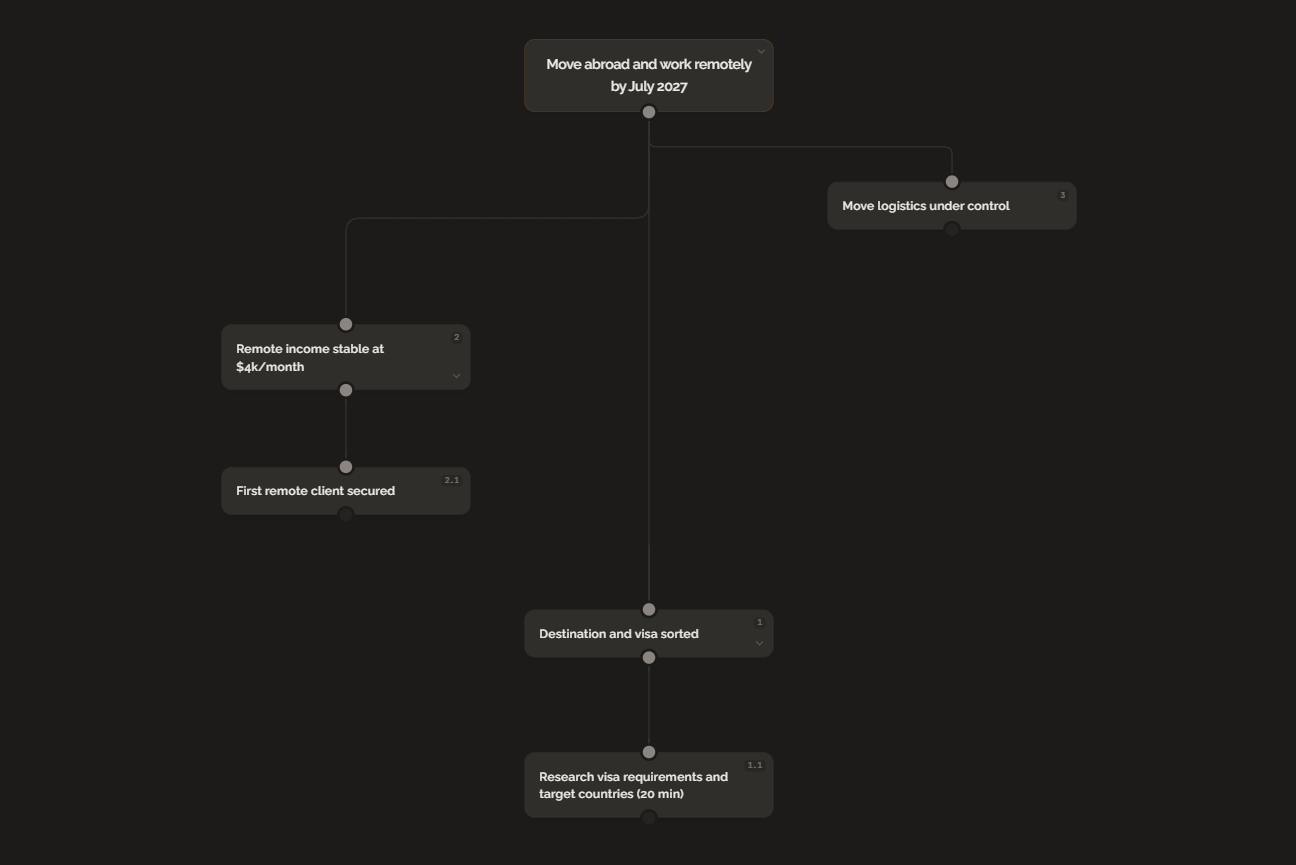
Here is what the pipeline looks like in practice using GoalBranch. The goal is one you might already have on your vision board.
Goal: Move abroad and work remotely by July 2027.
The backward plan starts at July 2027 and works backward:
- July 2027: Moved abroad, working remotely full-time
- April 2027: Remote-ready income stable at $4k per month
- January 2027: Freelance income at $2k per month
- October 2026: First remote client secured
- August 2026: Portfolio and website live
- June 2026: Skills updated for in-demand remote roles
- Today: Research visa requirements and target countries
Each milestone branches further. "First remote client secured" splits into networking strategy, cold outreach templates, proposal writing, and portfolio refinement. "Visa requirements" splits into country shortlist, application timeline, document preparation, and budget planning. The tree reveals what to do right now, not just what the finish line looks like.
The Bottom Line
Canva, Pinterest, Milanote, DreamBoard, and Storyflow all help you create a beautiful vision. None of them help you build the plan to get there. If you already have a vision board and want to turn it into actual progress, the next step is a backward plan. Start with the goal that is already on your board and work backward until you find something you can do today.
FAQ
What is the best digital vision board tool in 2026?
It depends on what you need. Canva is best for design and templates. Pinterest is best for collecting inspiration. Milanote is best for visual organization. GoalBranch is the only tool that turns a vision into a step-by-step backward plan.
Are digital vision board apps free?
Most offer free tiers. Canva has a generous free plan, Pinterest is entirely free, and Milanote has a free tier with limited boards. GoalBranch is free for 1 goal tree, with a paid plan at $9 per month. Pricing models vary by tool, from subscriptions to one-time purchases.
What is the difference between a vision board and a goal planning tool?
A vision board shows the destination. It is a collage of images representing what you want. A goal planning tool produces the route: the step-by-step dependency tree from where you are to where you want to be.
Can you add action steps to a digital vision board?
Most vision board apps are image-first. They are built for design and mood, not for task planning. You can add text notes to images, but there is no native backward planning, no dependency tree, and no progress tracking across steps.
Ready to try backward planning on your own goals?
Start planning freeMore guides
Best Goal Planning Apps in 2026 (Free and Paid)
From free habit trackers to AI goal planners, here are the best goal planning apps in 2026 compared by features, pricing, and what they help you do in detail.
Digital Vision Board vs Paper: Which One Sticks?
Digital boards are convenient. Paper boards feel real. Neither turns a vision into a plan. An honest comparison and the fix to make either format work.