Scripting vs Backward Planning: Write the Goal, Then Plan the Steps
Scripting writes your end state as if it already happened. Backward planning turns that end state into steps. Here is how the two fit together, with an example.
TL;DR: Scripting and backward planning are two halves of one job. Scripting writes the end state in vivid detail, as if it already happened. Backward planning starts at that end state and works out what has to be true just before it, repeating until you reach a first step you can do today. Use scripting for the destination and a backward plan for the route.
If you script, you already do something most planning methods struggle to get people to do: you describe the outcome clearly. You pick a date, a place, a scene. That specificity is valuable, and it is exactly what a planning method needs as its input.
What a script usually does not contain is the route. Writing "it is June and I am crossing the finish line" tells you where you are going. It does not tell you what to do this week. That gap is where backward planning fits.
What Scripting Is
Scripting is the practice of writing a desired outcome in the present or past tense, as though it has already happened. Most descriptions of the method ask for sensory detail: what you see, who is there, how the day feels. Some people script daily, some write one long page and reread it.
People get different things from it. Some use it as a way to focus attention on what they want. Others use it as a journaling habit that keeps a goal in view. This article does not need to settle that question. It only needs one fact: a good script is a specific, written description of an end state.
That is a strong starting point. Most goals people bring to a planner are vague ("get healthier", "make more money"), and a vague goal cannot be broken down well. A script has already done the hard part of choosing a specific destination.
What Backward Planning Is
Backward planning starts at the goal and works toward today. You ask what has to be true just before the goal is real, then ask the same question about that answer, and keep going until you reach something small enough to do now. For the full method, see what is backward planning.
A 2017 study in Psychological Science (Park, Lu, and Hedgcock) found that people who planned backward completed more tasks and reported greater motivation, higher goal expectancy, and less time pressure than forward planners.
The method needs a clear end state to work from. If the end state is fuzzy, every layer of the plan inherits the fuzziness. That is why a script makes such a good input.
Scripting vs Backward Planning at a Glance
| Scripting | Backward planning | |
|---|---|---|
| What it produces | A vivid description of the end state | A tree of steps from the end state to today |
| Direction | Forward in feeling, from the future scene | Backward in logic, from the goal to the present |
| Answers the question | What do I want, in detail? | What do I do first, and what depends on what? |
| What it leaves open | The route | Nothing, if you keep asking until the step is small |
| Best used | Daily or whenever you want to clarify | Once per goal, then revisited as things change |
They are not competitors. One gives you the destination, the other gives you the route, and the second is much easier when the first is done well.
How to Turn a Script Into a Plan in Five Steps
1. Pick the one line that states the outcome. A full script may be a page long. Choose a single sentence that says what is true at the end, with a date or a place in it. "It is July 2027 and I work from a small flat in a city I chose" is plannable. "Life feels easy" is not.
2. Ask what has to be true just before that line. Write the answer as a condition, not a task. For the line above: the visa is sorted, remote income is stable, and the move itself is organised. These become your first branches.
3. Ask the same question about each branch. Take "visa sorted" and ask what has to be true just before it. You might get "I know which country I am applying to". Keep going until the answer is something you could start today.
4. Stop at a step that fits in about twenty minutes. That size is deliberate. A step you can start in one sitting does not need motivation to begin. "Research visa requirements and target countries" qualifies. "Sort out the visa" does not.
5. Do that one step, then come back to the plan. The tree is not a contract. As you learn things, branches change. The first step is the only one you need to be sure of.
If you would rather not draw the tree by hand, generate yours automatically: paste the one line from step 1 and GoalBranch builds the branches for you, ending in a first step.
A Worked Example: From One Scripted Line to a First Step
Take the scripted line "It is July 2027 and I work remotely from a flat abroad." Working backward from it gives a tree like this:
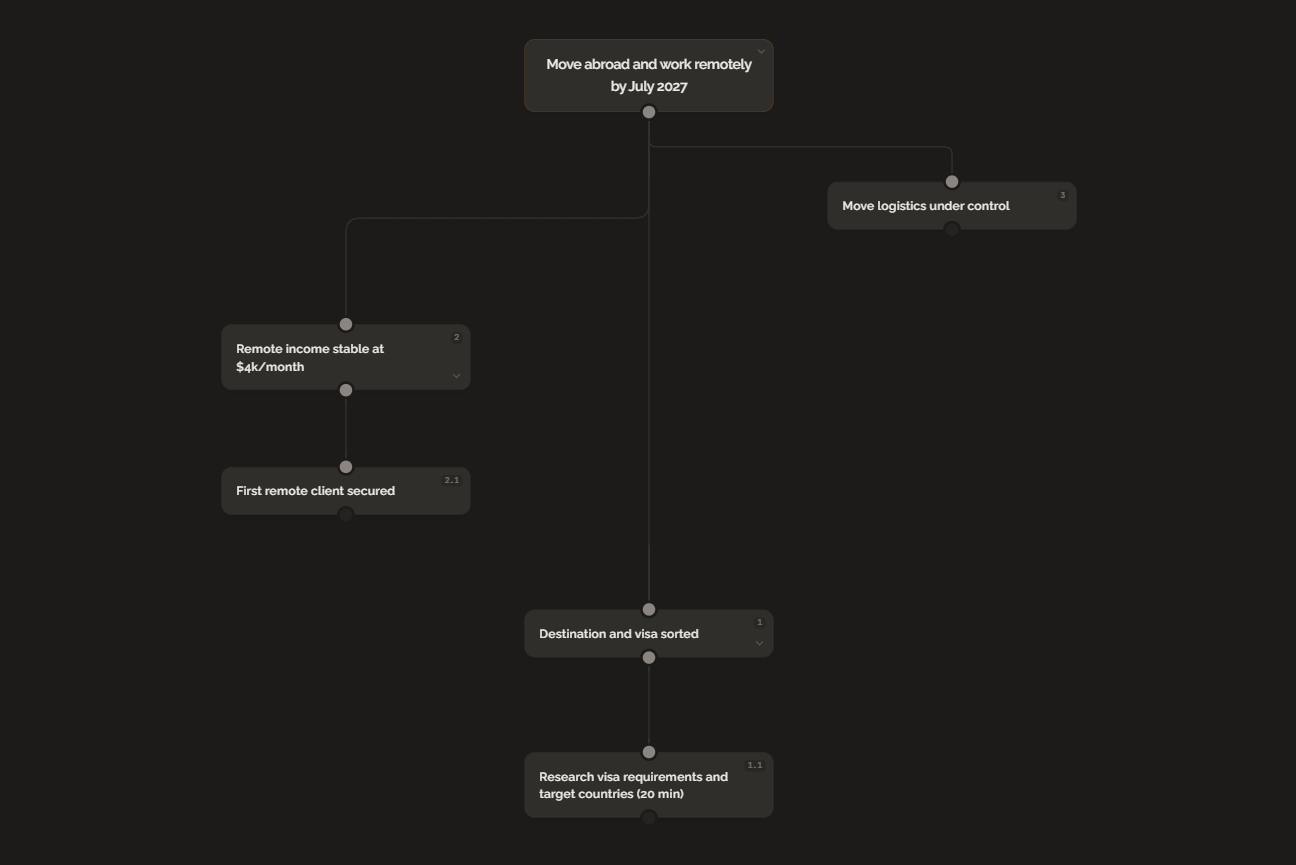
Three conditions sit directly under the goal: the destination and visa are sorted, remote income is stable, and the logistics of the move are under control. Each one can be broken down further. The income branch, for example, has a first piece of work under it: secure a first remote client.
The first step, "Research visa requirements and target countries," takes about twenty minutes. That is the distance between the scripted scene and something you can do tonight.
Notice what the script contributed. The date (July 2027) fixed the timeline. The place (abroad) fixed the destination question. The phrase "work remotely" fixed the income requirement. Each specific detail in the script became a branch in the plan.
What to Keep Doing and What to Add
You do not have to give up the script. If writing it daily is part of how you stay connected to the goal, keep it. A backward plan sits beside the practice, not in place of it.
What changes is where the script ends. Instead of finishing a session with only the scene, finish it by checking the tree: which branch is next, and what is the next small step. The scene keeps the destination vivid. The tree tells you what to do with the day.
For the same idea applied to a board of images instead of a page of writing, see how to turn your vision board into a plan and vision board vs action board. There is also a short page for this audience at the scripting page.
The Bottom Line
Scripting gives you a specific destination, and a specific destination is the best input a planner can have. Backward planning supplies the part a script leaves open: the chain of conditions between the page and the day. Take one line from your latest script, ask what has to be true just before it, and write down the first answer.
FAQ
What is scripting?
Scripting is a writing practice where you describe a desired outcome in the present or past tense, as though it has already happened. People use it to get clear on what they want, and the detail of the writing is what makes it useful as a starting point for a plan.
Can you use scripting and planning together?
Yes, and they cover different halves of the job. Scripting describes the destination in vivid detail. Backward planning starts from that destination and works out what has to be true just before it, repeating until you reach a step you can do today.
How do you write a script that is easy to plan from?
Make it concrete. Use a date, a place, and a result you could check. A scene such as a specific morning in a specific city gives a planner real dependencies to work back through, while a general feeling gives it nothing to hold on to.
What should you do after you write your script?
Pick one line that states the outcome, then ask what has to be true just before it. Write the answer down and ask again. Stop when you reach a step that fits in a short sitting, and do that step first.
Ready to try backward planning on your own goals?
Start planning freeMore guides
How Do You Turn a Vision Board Into a Plan?
A vision board shows what you want but not how to get it. Six steps turn any image on your board into a backward plan with a first step you can do today.
Vision Board With Goals: Attach a Step to Every Image
Most vision boards show dreams without the steps to reach them. Here is how to attach a backward plan to every image and turn your board into a real roadmap.