Reverse Goal Branch Template (Free: Excel, PDF, and Auto-Generated)
A free reverse goal branch template you can copy in one minute, plus a real example that works a big goal backward until the first step takes 20 minutes.
TL;DR: A reverse goal branch template is a four-layer worksheet: the goal (one specific sentence), the first-level branches (what must be true just before the goal), the sub-branches (what must be true before each branch), and the first step (one action under 20 minutes). Copy the template below, fill it in top to bottom, and stop breaking steps down the moment one is small enough to do this week. For Excel and PDF versions, scroll to the downloadable section.
Why a Goal Branch Template Works Better Than a To-Do List
A to-do list starts with what feels urgent today. A reverse goal branch starts with the finish line and works backward. The result is a plan where every step exists because the goal needs it, not because it was convenient to write down.
The method comes from an old book on curriculum design. It was later popularized in planning methodology as "begin with the end in mind." The research behind it is solid: a 2017 study in Psychological Science (Park, Lu, and Hedgcock) found that people who planned backward completed more tasks and reported greater motivation, higher goal expectancy, and less time pressure than forward planners.
A goal branch template gives you the structure. You fill in the blanks, and the backward logic does the rest.
The Template (Copy It)
This template works in any format: paper, Excel, Google Docs, or your notes app. It has four levels. Fill it in from the top and stop when a branch is small enough to do this week.
GOAL (one sentence, include the number and deadline if applicable)
  [Write your finish line here]

BRANCH 1 - what must be true just before the goal?
  [One major milestone]
  Sub-branches - what must be true just before this milestone?
    -
    -
    -

BRANCH 2 - what must be true just before the goal?
  [Another milestone]
  Sub-branches
    -
    -
    -

BRANCH 3 - what must be true just before the goal?
  [A third milestone]
  Sub-branches
    -
    -
    -

FIRST STEP (one action, 20 minutes or less, doable today)
  [The smallest branch you found]
Stop breaking down the moment one branch is a single action you can complete in 20 minutes. That is your starting point, and it is the only thing you need to think about today.
Prefer not to fill it in by hand? Generate yours automatically: type the goal and GoalBranch builds the whole tree for you in seconds, then lets you expand any branch that still feels too big.
How to Fill in the Template
1. Write the goal as one specific sentence. Vague goals produce vague branches. "Get healthy" gives the template nothing to work backward from. "Save $10,000 in 12 months" does. If the goal has a number or a date, include both.
2. List what must be true just before the goal is done. These are your first-level branches. Three is a good number for most goals. Think conditions, not actions. Not "go to the gym" but "I have a training schedule I can follow."
3. Break each branch into sub-branches with the same question. For every milestone, ask what must be true just before it. Each answer is a sub-branch. This is the step where hidden dependencies show up.
4. Stop when a branch is small enough to do this week. The template is not a complete map of the future. It is a tool for finding the one action that gets you moving. If every branch still feels heavy, break the lightest one down once more.
5. Do the first step now. Pick the smallest branch and complete it. Momentum comes from finishing a real action that the goal actually needs, not from refining the plan.
A Real Example: Save $10,000
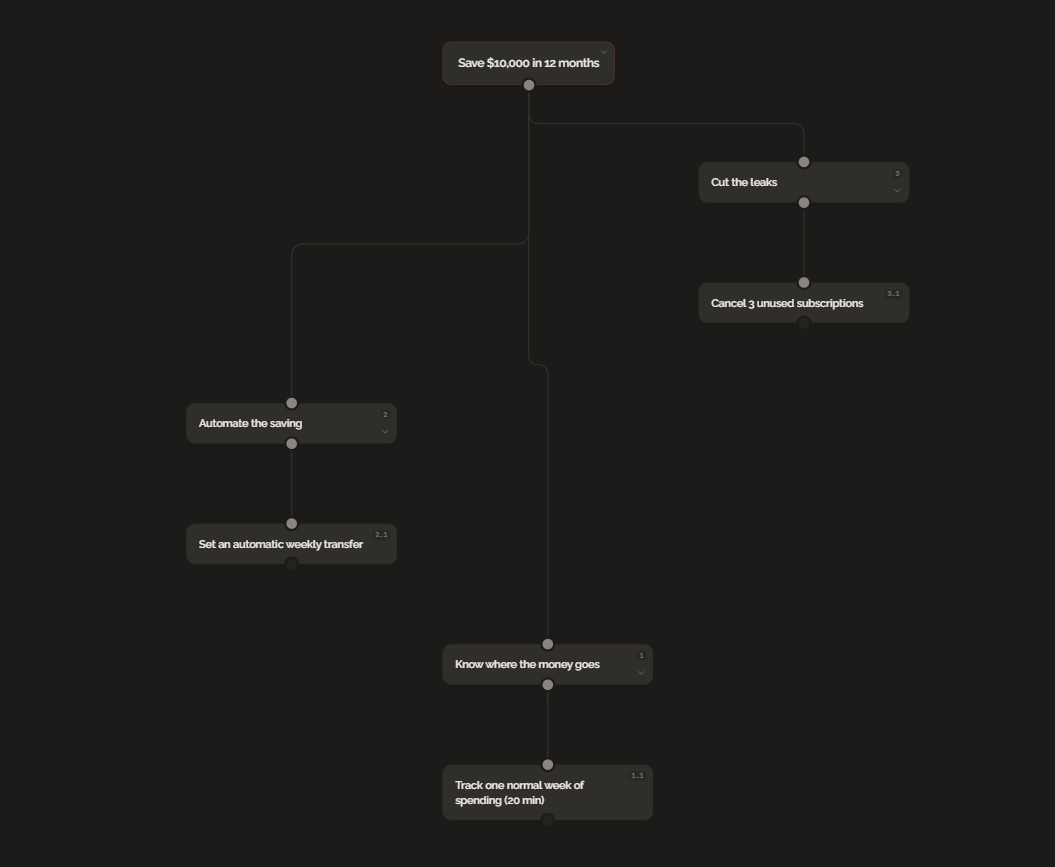
Here is the template filled in for a common financial goal. The tree this produces is shown below.
GOAL: Save $10,000 in 12 months

BRANCH 1: Know where the money goes
  Sub-branches:
    - Track one normal week of spending
    - Categorize every expense
    - Spot the biggest spending category

BRANCH 2: Automate the saving
  Sub-branches:
    - Set an automatic weekly transfer
    - Adjust the amount until it is uncomfortable but doable
    - Name the account so it is not the everyday account

BRANCH 3: Cut the leaks
  Sub-branches:
    - Cancel 3 unused subscriptions
    - Switch one recurring bill to a cheaper plan
    - Cook 2 more meals at home per week

FIRST STEP: Track one normal week of spending (20 minutes)
The first step takes 20 minutes. Open your bank and credit card apps, look at the last seven days, and write down every expense in a notes app. That one action unlocks the rest of the plan.
Excel and PDF Versions
The copyable text above works in any app. If you prefer a spreadsheet, copy the template into a single Excel sheet with one row per branch. Label four columns: Goal, Branch, Sub-Branch, First Step. Filter by branch to focus on one strand of the plan at a time.
For a printable PDF version, copy the text template into Google Docs or Word, adjust the spacing to fit one page, and export as PDF. One page is enough for any goal with three branches.
For Students and Teachers
The same structure adapts to academic goals without changing a word of the template.
Students fill it in backward from an exam date or application deadline. A filled-in branch for an exam looks like: Goal is "Score 85+ on the June final." Branch is "Know the exam." Sub-branches are "Get past papers," "Find the mark scheme," "Identify the question format." First step is "Download the last three past papers from the exam portal (20 minutes)."
Teachers fill it in backward from a learning objective. Goal is "Students can write a persuasive essay by term end." Branch is "Students understand argument structure." Sub-branches are "Teach claim-evidence-analysis framework," "Model a worked example," "Give guided practice with feedback." First step is "Write the starter paragraph that hooks into the lesson (20 minutes)."
For more specific templates aimed at students, see our goal setting templates for students.
Why This Beats Forward Planning
Forward planning drifts. You write down tasks that feel productive today, but they may not move you toward the actual goal. A reverse goal branch template anchors every action to the finish line. The difference is in the question you ask. Forward plans ask "What can I do next?" Reverse goal branches ask "What has to be true just before the goal is done?" The second question produces better plans because it forces you to think about prerequisites, not possibilities. It is the same structure our reverse goal setting template and backward goal setting worksheet use.
The Bottom Line
A reverse goal branch template is one page, four levels, and a single question asked repeatedly until the answer is small enough to do today. Copy the template above, fill it in with one real goal, and do the first step. The rest of the plan will still be there tomorrow.
FAQ
What is a reverse goal branch template?
A reverse goal branch template is a structured worksheet that starts with your end goal and breaks it into milestone branches by repeatedly asking what must be true just before each level, until you reach a step small enough to do this week.
How is a goal branch different from a goal tree?
A goal branch is a single strand of the reverse plan: one milestone and everything required before it. A goal tree is the full map of every branch together. The template in this article builds one branch at a time, and the full tree emerges from the combination.
Do I need an app to use this template?
No. The template works on paper, in Excel, or in any notes app. An app like GoalBranch is useful when you don't know what the intermediate steps should be, because it can propose the branches for you.
Can students and teachers use the same template?
Yes. Students use it to work backward from an exam date or application deadline. Teachers use it to design lessons backward from a learning objective. The structure is the same; only the goal changes.
Ready to try backward planning on your own goals?
Start planning freeMore guides
Goal Setting Templates for Students (Free, With a Real Example)
Free goal setting templates for students: a backward planning worksheet, semester tracker, and weekly target sheet. Each includes a worked exam prep example.
Digital Vision Board Template (Free): Structure Beats Collage
A vision board shows your dream. A digital vision board template with backward planning turns each image into a next step. Free template and example inside.