How to Save $10,000 in a Year: A Backward Plan You Can Start Today
A backward plan for saving $10,000 in a year: how much to set aside each week, how to automate the transfer, and the 20-minute first step to start today.
TL;DR: Saving $10,000 in a year works out to about $192 a week, or $833 a month. That number is only useful once it's automated. The backward plan is three moves in order: track one normal week of spending to see where the money actually goes, set up an automatic weekly transfer so the saving happens before you can spend it, then cut the 2 or 3 recurring costs the tracking week exposed. Start with the tracking, not the cutting.
How Much You Actually Need to Save
$10,000 in 12 months is $833.33 a month, or $192.31 a week. Those are the two numbers that matter. Everything else, budgeting apps, spreadsheets, willpower, is in service of hitting one of them consistently.
Most people who try to save $10,000 skip straight to cutting expenses, get discouraged after two weeks, and quit. The backward plan works in the opposite order: automate the number first, then find out where it comes from.
Why This Needs a Backward Plan, Not a Budget
A budget is forward planning: list your income, list your expenses, see what's left, hope it's enough. The problem is the "hope it's enough" part. Whatever's left at the end of the month is rarely $833.
Backward planning starts at the finished goal, $10,000 saved by a specific date, and works backward to find out what has to be true today for that number to be real. If you're new to the general method, see how to break a big goal into small steps.
Step 1: Define the Outcome
Weak: "Save more money" Strong: "Save $10,000 by [a date 12 months from now], in a separate account I don't touch"
The strong version has a number, a deadline, and a rule (a separate account). Without the separate account, saved money quietly becomes spending money again.
Step 2: Map the Milestones Backward
Starting from the finished goal and working backward:
- Before $10,000 saved -> $833/month landed in the account every single month
- Before a consistent $833/month -> an automatic weekly transfer of about $192 running without you thinking about it
- Before the transfer feels safe to set -> 2-3 recurring costs identified and cut, freeing up room in the budget
- Before you know what to cut -> one normal week of spending tracked, in full, with no edits
That last milestone is the actual starting point. Not the transfer, not the cutting. The tracking.
Step 3: Build the Tree
Each milestone becomes a branch, and each branch has its own first move:
- Know where the money goes. Track one normal week of spending, in full. Twenty minutes with a bank statement or a notes app.
- Automate the saving. Set an automatic weekly transfer for the amount the tracking week says you can actually spare.
- Cut the leaks. Cancel 2 to 3 unused subscriptions or recurring charges the tracking week turned up.
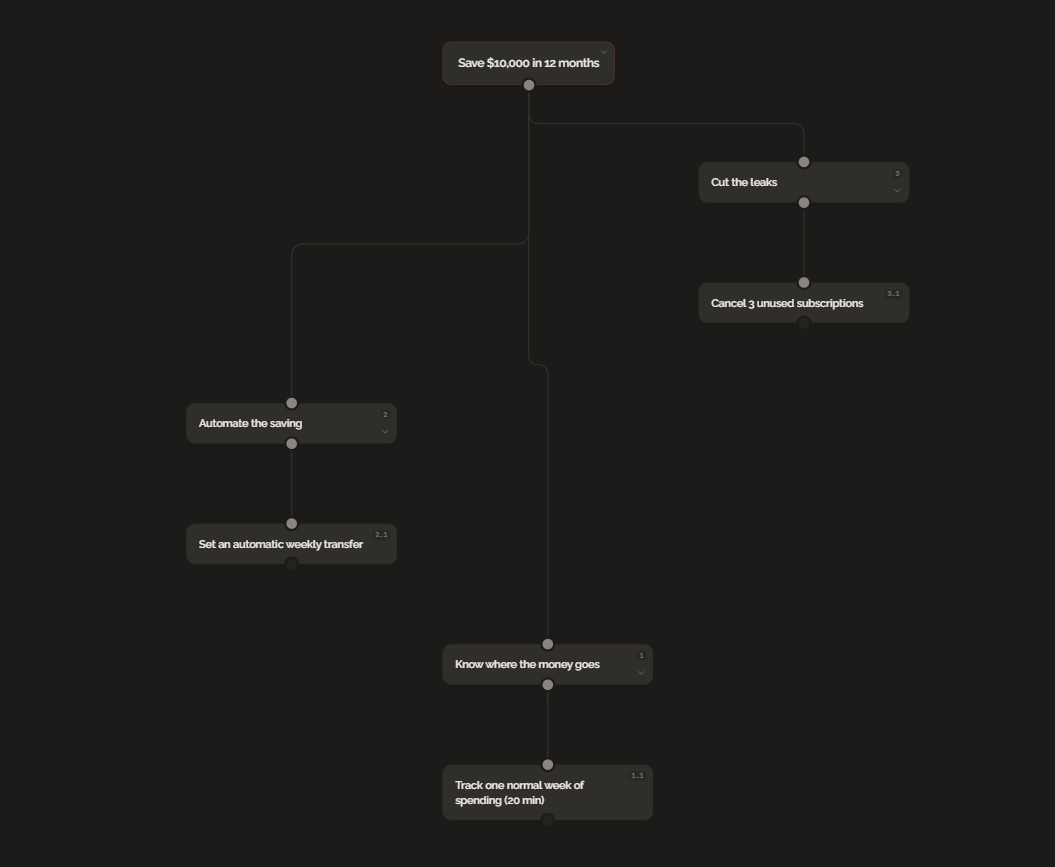
GoalBranch builds this tree automatically from a single goal. Type "save $10,000 in 12 months" and it generates the branches, the dependencies, and the first step, so you're not guessing at the order. Generate yours automatically and see your first step in 60 seconds.
Step 4: Do the First Step Today
The first branch isn't automating anything. It's tracking one week of ordinary spending, exactly as it happens, with no adjustments made in advance to look better. Twenty minutes, one week, no changes yet.
Everything downstream depends on this. You can't automate the right number or cut the right subscription until you know what a normal week actually costs.
Real Example: $10,000 in 12 Months
Goal: $10,000 saved in a separate account within 12 months
Backward plan:
- Month 12: $10,000 in the account. Goal reached.
- Month 11: $833/month transfer running for 11 straight months without a missed week.
- Month 2: First full month on autopilot. Weekly $192 transfer confirmed as sustainable after the first cuts.
- Month 1, week 3: 2 unused subscriptions and one recurring delivery service cancelled.
- Month 1, week 2: Automatic weekly transfer of $192 set up.
- Month 1, week 1: One normal week of spending tracked in full.
The real first step is the last line: track one week. It takes 20 minutes.
Common Mistakes
Cutting before tracking. Guessing at what to cut wastes the one piece of information that actually helps: what you spend without thinking about it. Track first.
Manual saving instead of automatic. "I'll transfer what's left over" is a plan that survives exactly until a tight week. The automatic transfer is what makes the number real.
Treating $10,000 as one big number instead of $192 a week. The full amount is discouraging. The weekly number is a decision you can make and forget about.
The Bottom Line
Saving $10,000 in a year isn't a discipline problem, it's a sequencing problem. Track a week, automate the transfer, then cut what the tracking exposed, in that order. The same backward method works for any personal goal with a number and a deadline; see backward planning for personal goals for the fitness and habit versions. Start with the 20-minute tracking week. Everything else follows from it.
FAQ
How much do I need to save each week to hit $10,000 in a year?
About $192 a week, or roughly $833 a month, saved consistently for 12 months. The number only works if it's automated; manual saving tends to skip weeks when money is tight.
What's the fastest way to start saving $10,000?
Set up the automatic transfer before you do anything else. Cutting expenses and tracking spending both matter, but neither one moves money into savings by itself. The transfer does.
Is saving $10,000 in a year realistic on an average income?
It depends more on the system than the paycheck. A tracked week of spending usually turns up 2 to 3 recurring costs worth cutting, and an automatic weekly transfer keeps the rest from disappearing. Those two moves matter more than the size of your income.
Ready to try backward planning on your own goals?
Start planning freeMore guides
How to Get Your First Freelance Client: Work Backward From the Invoice
Landing your first freelance client is a chicken-and-egg problem. Working backward from a clear invoice gives you a concrete path from zero to paid work.
How to Plan a Career Change Backward (Without Quitting Blind)
Backward planning for a career change starts with the target role, not the resume. Here is how to plan a career pivot step by step, with a real example tree.