5 Tools for Building a Goal Tree (From Whiteboard to App)
A goal tree turns your ambition into a dependency map. Compare five tools for building one, from a whiteboard to apps that generate the tree automatically.
TL;DR: A goal tree maps the dependency chain from your biggest ambition to the smallest step. You can build one on a whiteboard, in Miro or Flying Logic, or in a purpose-built app like GoalTree or GoalBranch. The right tool depends on whether you need collaboration, complex logic, or AI that generates the tree for you in 60 seconds.
A goal tree is a visual backward plan. You start with the goal at the top and work backward through milestones, branches, and single-sitting actions. Every node exists because the level above it depends on it. A 2017 study in Psychological Science (Park, Lu, and Hedgcock) found that people who planned backward completed more tasks and reported greater motivation, higher goal expectancy, and less time pressure than forward planners. The question is which tool to build one with. Here are five options.
1. Whiteboard or Paper
A whiteboard is the fastest way to sketch a goal tree. No learning curve, no login, no formatting. You draw the goal at the top, branch into milestones, and keep splitting until every branch ends in something you could do in 20 minutes.
The downsides appear fast. Branches need rearranging, but erasing and redrawing is slow. A tree with more than two layers becomes hard to fit on one board. A whiteboard is free and immediate, but it stops scaling the moment the tree gets interesting.
2. Miro
Miro is a digital whiteboard with tree diagram templates and AI generation. You start from a template, add nodes, and connect them. The AI feature can brainstorm ideas and organize them into a hierarchical structure.
Miro works well when a goal tree is part of a larger project workspace. You can embed it alongside timelines and process maps on the same board. The collaboration features let a team build the tree together in real time.
Miro is less useful when you want the tree itself, not the workspace around it. The AI helps generate ideas but does not structure a dependency chain. You still decide where each node goes and whether the logic holds. Miro is a general-purpose tool, not designed for backward planning specifically.
Free tier: Core features. Paid: Team and enterprise plans.
3. Flying Logic
Flying Logic is professional visual planning software built on the Theory of Constraints. It maps cause-and-effect relationships, builds current reality trees, and tests assumptions visually. The automatic layout engine keeps diagrams readable, and the software handles formatting so you focus on the logic.
Flying Logic is the right tool when your goal tree needs to survive a room of skeptical stakeholders. The logic-testing features catch gaps in your reasoning. But it is overkill for personal goals. The learning curve is steeper than Miro or a purpose-built goal tree app, and there is no free tier for casual use. It is listed here because no other tool matches its capability for rigorous logic modeling, but most readers will find Miro or GoalBranch more practical.
Pricing: One-time purchase. Paid plans only.
4. GoalTree
GoalTree (goaltree.life) is a mobile and web app purpose-built for goal trees. It uses an eight-tier system from life goal down to daily actions. The guided wizard walks you from a life goal to today's task, and progress ripples upward through the tree.
GoalTree focuses on breakdown rather than generation. You build the tree yourself, tier by tier. There is no AI to generate branches from a goal sentence.
Free tier: First goal tree free, unlimited goals. Paid: One-time purchase for unlimited trees.
5. GoalBranch
GoalBranch is built around backward planning from the ground up. You type a goal sentence and it generates a complete dependency tree with milestones, branches, and single-sitting actions. The goal tree method is built into the app: each node exists because the one above it depends on it, and you can expand any branch or regenerate sections with custom feedback.
Where GoalTree and Miro ask you to build the tree yourself, GoalBranch produces it from a single sentence. You still review and customize, but the initial structure appears in 60 seconds. The infinite canvas supports trees up to six levels deep.
Free tier: 1 goal tree, 25 tree actions per month. Paid: Pro at $9 per month for 30 goals and 500 actions.
Comparison Table
| Tool | Best For | Backward Planning | AI Generates the Tree | Learning Curve | Pricing |
|---|---|---|---|---|---|
| Whiteboard / Paper | Quick drafts | Manual | No | None | Free |
| Miro | Team collaboration | Manual | Brainstorming only | Low | Free tier + paid plans |
| Flying Logic | Complex logic modeling | Manual | No | High | One-time purchase |
| GoalTree | Tiered goal breakdown | Manual wizard | No | Low | Free + lifetime purchase |
| GoalBranch | AI-powered backward planning | Native, automatic | Yes, from one sentence | Low | Free (1 tree) + $9/mo |
The table shows one clear difference: GoalBranch is the only tool where the tree appears because the AI generated it from a goal statement. Every other tool gives you a blank canvas or a template and expects you to fill in the structure. If you already know the steps, Miro or GoalTree will serve you well. If you have a goal and need to discover the steps, generate your goal tree and see your first step in 60 seconds.
A Goal Tree in Action
Here is what a backward-planned goal tree looks like in GoalBranch.
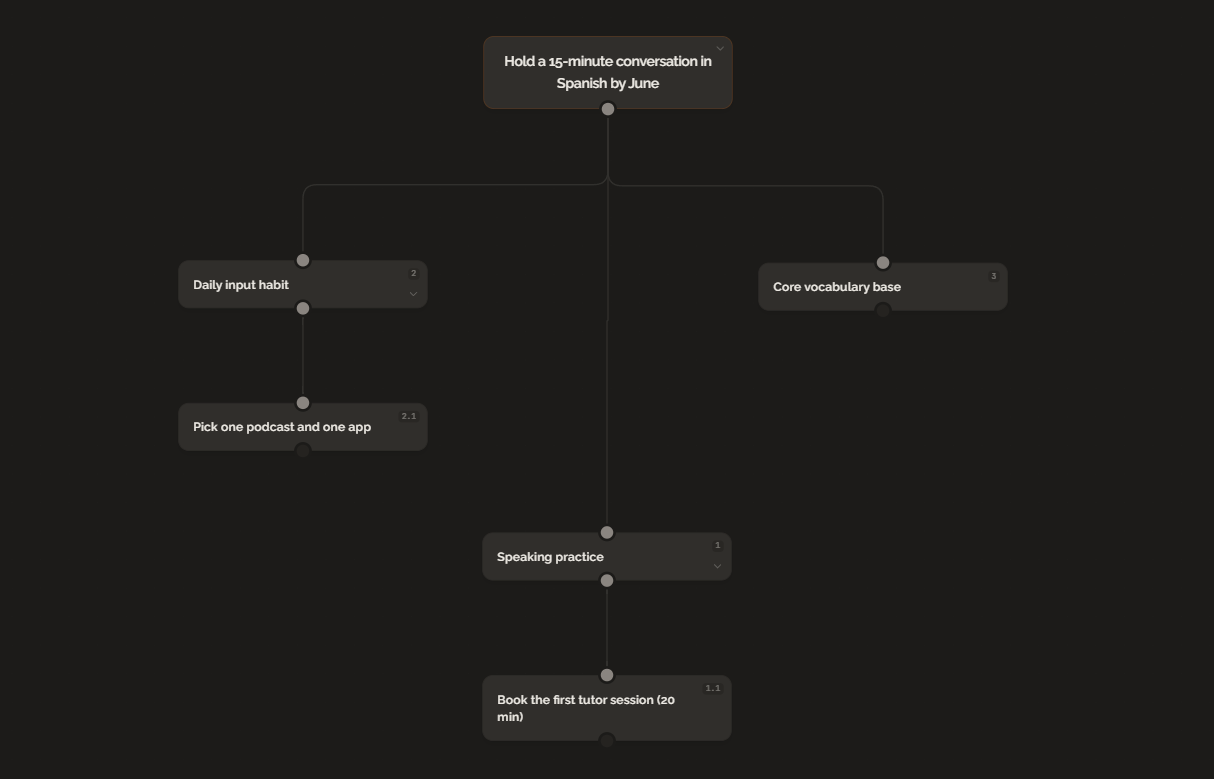
Goal: Hold a 15-minute conversation in Spanish by June.
Milestones working backward:
- Speaking practice
- Daily input habit
- Core vocabulary base
The first action under speaking practice is booking the first tutor session. That takes 20 minutes. Every branch exists to support the same goal.
The Bottom Line
A goal tree reveals the dependency chain between the finish line and the first step. A whiteboard is enough to start, Miro handles collaboration, Flying Logic handles complex logic, and GoalTree structures the breakdown. But if you want the tree generated from a goal, not built by hand, GoalBranch matches the method. Pick the tool that removes the most friction between you and that first 20-minute step. For a broader look, see our goal planning apps roundup.
FAQ
What tools can I use to build a goal tree?
You have options at every level. A whiteboard works for quick drafts. Miro offers tree diagram templates with AI generation. Flying Logic is built for professional strategy planning. GoalTree and GoalBranch are purpose-built goal tree apps, with GoalBranch being the only one that generates the tree from a goal sentence.
Can I build a goal tree without software?
Yes. A whiteboard, sticky notes, or paper is enough to draw a goal tree. The structure matters more than the tool: start with the goal at the top and work backward through milestones and actions. The downside is that paper is hard to edit and does not scale to complex goals.
What is the best tool for building a goal tree?
It depends on the goal and your workflow. For a one-time personal goal, a whiteboard or paper is fine. For team planning, Miro's templates work well. For complex strategy logic, Flying Logic is unmatched. For generating a full dependency tree from a single sentence, GoalBranch is the only option built around backward planning.
Does Miro have a goal tree template?
Miro includes tree diagram templates and an AI feature that generates hierarchical structures from prompts. You can build a goal tree manually or use AI to brainstorm branches. Miro does not generate a goal-specific dependency tree from a single sentence the way a purpose-built goal tree app like GoalBranch does.
Ready to try backward planning on your own goals?
Start planning freeMore guides
Best Goal Planning Apps in 2026 (Free and Paid)
From free habit trackers to AI goal planners, here are the best goal planning apps in 2026 compared by features, pricing, and what they help you do in detail.
Digital Vision Board vs Paper: Which One Sticks?
Digital boards are convenient. Paper boards feel real. Neither turns a vision into a plan. An honest comparison and the fix to make either format work.